
AI Rap Video Generator from Photos
Put yourselfin the video
Find your rap video style. Choose a solo scene or a duo with a friend, then add your photos.
Try the photo setup and save a draft. Video generation is not available yet.
THE TEMPLATE LIBRARY
Rap & music video templates
Explore the available rap video templates. Watch a style example, check the photo requirements, and choose your cast.
1 templates
CHOOSE. ADD. SAVE.
How to Make a Rap Video from Your Photos
Your photos. Your moment.
Pick your scene
Browse rap and music video templates. Pick the scene and cast you want.
Add your photos
Use a clear portrait for each person. Your template shows how many photos to add.
Save your setup
Check each photo and save your draft. Reopen it from My drafts in this browser.
Draft previewSave your photos and template choice together. This preview does not generate a video.
Open workspace
AI-generated artwork shows each style. It is not a finished video or a preview made with your photos.
How to prepare your photos for a rap videoCHOOSE YOUR CAST
Go solo.
Or make a rap duo.
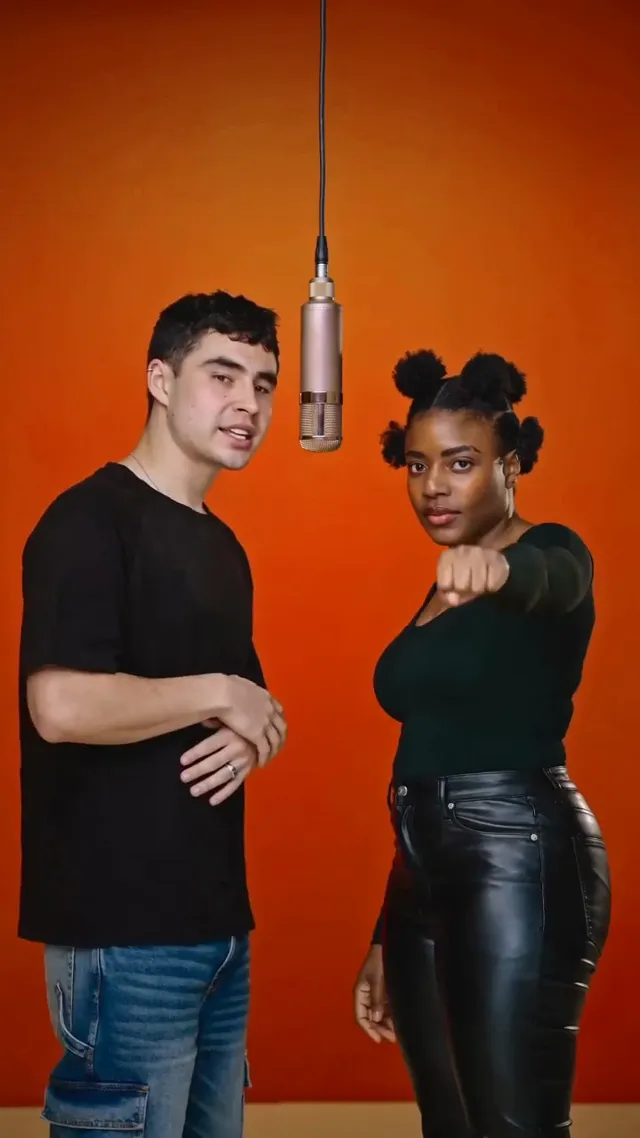
Hotel Lobby
Two portraits. One orange studio. Choose the lead and response roles for your Hotel Lobby duo.
View templateArtwork and videos are style examples, not previews made with your photos.
A FEW THINGS TO KNOW
Before you
drop it
Can I make a rap video from one photo?
A solo rap video template uses one photo. A duo template uses two separate portraits, one for each person. The workspace shows the exact requirements. You can prepare either draft now; video generation is not available yet.
What photos work best?
Choose a clear, well-lit photo with one face visible. Avoid sunglasses, heavy filters, and faces hidden behind hands or other objects. The preview accepts JPEG, PNG, and WebP files up to 10 MiB each.
Can I use a friend's photo?
Yes, if your friend has given you permission to use their photo for this purpose. Only use photos you own or have permission to use.
Can I generate and download a video now?
Not yet. You can choose a template, add your photos, and save a draft. Saving does not start video generation or a payment. Finished videos and video downloads are not available.
Is this a rap video maker or a song generator?
iRap focuses on photo-based rap video templates. The current preview lets you choose a scene, add portraits, and save a draft. It does not write lyrics, create songs, or turn an uploaded song into a music video.
Can I use a video from TikTok or X?
This preview does not import videos or links from TikTok or X. You can choose from the style artwork in the template library. These images are not verified viral clips, and adding photos does not replace the people in them.
Where are my photos and drafts saved?
Photos stay in this browser in the current preview. Clicking Save draft stores them on this device. You can remove a saved draft from My drafts. Browser data can be cleared or lost, and drafts do not sync across devices.
Only add photos you have permission to use.
Preview photos stay in this browser. You control saved drafts.
CHOOSE YOUR NEXT SCENE
Your photos.
Your video.
Choose a templateFind a rap video template for yourself or a duo. Add your photos and save your idea as a draft.